
Contents · Edition 025
Edition 025
From the Editors
Welcome to Volume III of Hustle Mag. The first volume built the foundations of a business; the second built the engine that brings customers in and keeps them. This volume is about what happens inside: the systems, money and leadership that decide whether a business can grow without consuming its founder.
Many founders reach a point where the business depends on them for everything. Every question comes to them. Every task needs their approval. Holidays feel impossible, and growth simply means more hours. The work is good, but the business is fragile, because so much of it lives in one person's head.
This issue is about changing that. Systems are not bureaucracy. They are the written answers to the questions a business faces every day: how do we do this, in what order, to what standard, and how do we know it is done well? Once those answers exist, others can follow them, quality becomes consistent and the founder can spend time on the work only they can do.
Start with one process. Write it down. Use it. Improve it. That habit, repeated, is how small businesses become reliable ones.
The Editors, Hustle Mag
In This Edition
Systems That Scale
Processes That Let a Business Run Without Constant Firefighting
A system is a repeatable way of doing something important: documented, followed and improved over time. Systems reduce mistakes, save time, make quality consistent and allow a business to function when the founder is not present.
This issue builds systems step by step. We start with why systems matter and how to find the processes worth documenting. We then cover writing processes down, checklists and templates, delegating through systems, building quality into the process and improving systems over time.
Each article ends with one step that makes your business less dependent on memory and heroics.
Cover Story · 01 of 08
From Firefighting to Systems
A business that depends on memory and heroics cannot grow calmly. Systems change that.

Many small businesses run on the founder's memory. The founder knows how to prepare a quote, which supplier to call, how to onboard a client and what to check before delivery. This works while the business is small. As it grows, the founder becomes a bottleneck: every question waits for them, mistakes appear when they are busy and taking a holiday feels impossible.
Daily life becomes firefighting: solving the same problems repeatedly, often under pressure. Systems replace firefighting with reliable, repeatable ways of working.
What a system is
A system is a defined way of completing an important task. It may include a written procedure, a checklist, templates, tools and a clear owner. A good system answers four questions: what needs to happen, in what order, to what standard and who is responsible?
Systems do not need to be complicated. A one-page procedure and a checklist can transform how reliably a task is done.
Why systems matter
Systems create several benefits at once:
- Consistency: customers receive the same quality every time.
- Fewer mistakes: important steps are not forgotten.
- Time saved: nobody reinvents the process each time.
- Delegation: others can do the work without constant supervision.
- Resilience: the business continues when someone is absent.
- Value: a business with documented systems is easier to grow and, eventually, to sell.
Systems free the founder
Without systems, founders spend their time answering questions and fixing avoidable problems. With systems, they can focus on work only they can do: strategy, key relationships, product development and leadership.
The aim is not to remove the founder from the business, but to remove the founder from tasks that do not need them.
Start with recurring pain
The best place to begin is wherever the same problem keeps appearing. If quotes are often inconsistent, systemise quoting. If new clients frequently feel confused, systemise onboarding. If deliveries are sometimes incomplete, systemise final checks.
Recurring problems show where a system will deliver the fastest return.
If new clients frequently feel confused, systemise onboarding.
Systems are living documents
A system is never finished. As the business changes, processes change. Treat systems as living documents that improve with use rather than rigid rules carved in stone.
A practical tool: the firefighting log
For two weeks, write down every problem you have to solve, every question you are asked more than once and every task you had to redo. At the end, group the entries. The three most frequent groups are the processes most in need of a system. This simple log turns a vague feeling of chaos into a clear starting list.
Common mistakes
Founders often believe they are too small for systems, try to document everything at once, write procedures nobody reads or create systems and then ignore them. Others confuse systems with software, buying tools before defining the process. Start small, write simply, use what you write and improve it.
An example in practice
A small cleaning company relied on the owner to explain every job to new staff. Quality varied and complaints were frequent. The owner documented a standard cleaning procedure for each type of property, created room-by-room checklists and introduced a short final inspection. New staff became productive faster, complaints fell sharply and the owner took her first two-week holiday in years.
Measuring the effect
Before introducing a system, note how often the related problem occurs, how long the task takes and how many questions it generates. Measure the same things a month after the system is in use. Visible improvement builds the motivation to systemise the next process.
Systems and growth
Without systems, growth multiplies chaos: more customers mean more questions, more mistakes and more pressure on the same few people. With systems, growth multiplies capacity: new team members learn faster, quality stays steady and the founder's time is protected. Systems are what allow a business to grow without its problems growing at the same rate.
Foundations · 02 of 08
Finding Your Core Processes
Not every task deserves a system. Start with the processes that matter most to customers and profit.
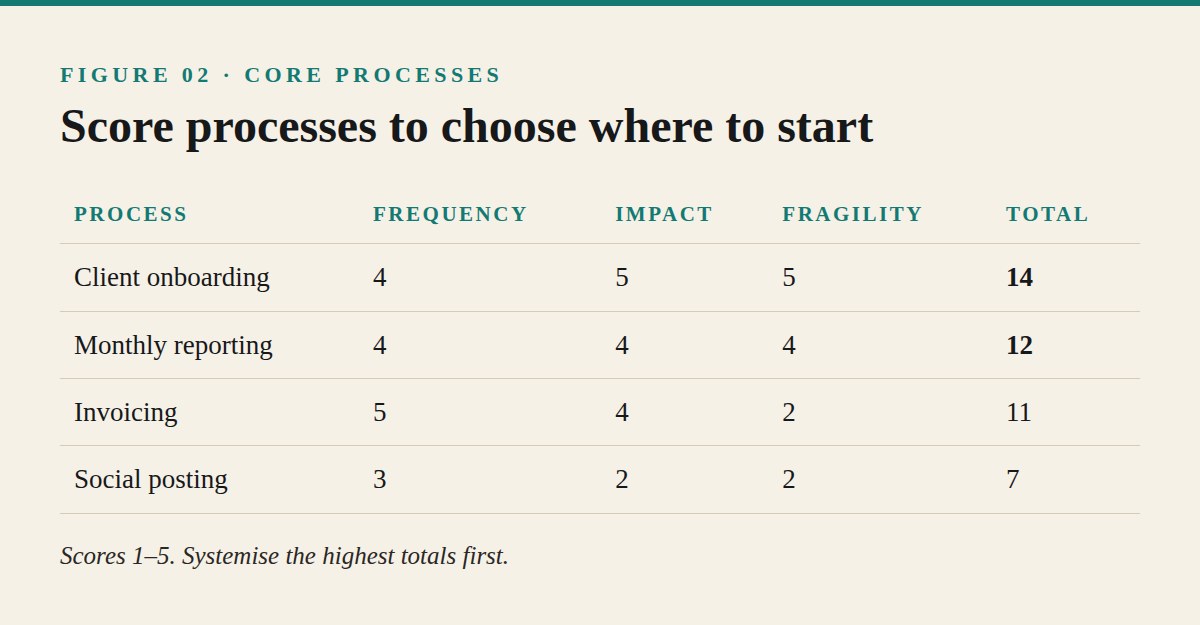
Every business performs dozens of tasks: answering enquiries, preparing quotes, delivering work, invoicing, ordering supplies, posting on social media, hiring and many more. Trying to document everything at once is overwhelming and rarely succeeds. The better approach is to identify the core processes, the small number of activities that most affect customers, quality and profit, and systemise those first.
Map what the business actually does
Start by listing the main activities of your business from a customer's first contact to final payment and follow-up. Many businesses find their work falls into a few broad areas:
- Winning customers: marketing, enquiries, quotes and sales.
- Delivering: onboarding, producing the product or service and quality checks.
- Getting paid: invoicing, payment follow-up and bookkeeping.
- Keeping customers: support, follow-up and repeat business.
- Running the business: hiring, suppliers, tools and administration.
Under each area, list the specific processes involved.
Score each process
For each process, ask three questions. How often does it happen? How much does it affect customers or revenue? How often does it go wrong or depend on one person? Score each from one to five.
Processes that are frequent, important and fragile deserve attention first.
Look at handovers
Many problems occur where work passes from one person or stage to another: from sales to delivery, from delivery to invoicing, from one team member to another. Handovers are often undocumented, which leads to lost information and missed steps.
Pay special attention to processes that involve handovers.
Identify founder-dependent tasks
List the tasks that only you can currently do. Some genuinely require your expertise or judgement. Others depend on you simply because the knowledge has never been written down. These are prime candidates for systems, because documenting them frees your time.
Every process should have an owner: the person responsible for making sure it works and for keeping its documentation current.
Choose three to start
Select the three highest-scoring processes and focus on them for the next month or two. Completing three useful systems is far more valuable than starting twenty that are never finished.
Name an owner for each
Every process should have an owner: the person responsible for making sure it works and for keeping its documentation current. In a very small business, the founder may own most processes at first, but naming owners prepares the business for delegation.
A practical tool: the process inventory
Create a simple table with columns for process name, business area, frequency, impact, fragility, total score, owner and status. Fill it in during one focused session. The inventory becomes your systems roadmap, showing what exists, what is missing and what to tackle next.
Common mistakes
Businesses often start with easy but unimportant processes, ignore handovers, try to systemise everything at once or forget to assign owners. Others document processes that rarely happen while the frequent, fragile ones remain in someone's head. Prioritising by frequency, impact and fragility avoids these traps.
An example in practice
A small marketing agency felt constantly busy but disorganised. Its process inventory revealed three high-scoring processes: client onboarding, monthly reporting and invoicing. Each depended heavily on the founder. By systemising those three first, the agency reduced late reports, cut onboarding time in half and stopped forgetting to invoice small pieces of work.
Revisiting the inventory
Review the inventory every quarter. As systems are completed, mark them done and move to the next highest scores. New processes appear as the business grows, such as hiring or new services, and should be added and scored like the rest.
Questions that reveal fragile processes
A few questions quickly expose processes that need attention. What would break if I were away for two weeks? Which tasks generate the most questions from staff or customers? Where do customers most often complain? Which jobs do we regularly redo? The answers usually point to the same small set of processes, which should be systemised first.
Documentation · 03 of 08
Write It Down Once
A clear, simple procedure saves the same explanation from being given a hundred times.
Many founders explain the same task repeatedly: to new staff, to freelancers, to themselves after a few months away from it. Each explanation takes time, and each version is slightly different. Writing a process down once creates a single, reliable reference that anyone can follow.
Good documentation is short, clear and easy to use. It is written for the person doing the work, not to impress anyone.
Capture the process as it happens
The easiest way to document a process is to capture it while doing it. Record your screen while completing a digital task, take photographs of a physical process or simply note each step as you go. Capturing real work produces more accurate procedures than trying to remember steps later.
Short screen recordings with a narrated explanation can be especially useful for software tasks.
Use a simple structure
A useful procedure usually includes:
- Purpose: why the process exists and what good looks like.
- Trigger: what starts the process.
- Owner: who is responsible.
- Tools and inputs: what is needed.
- Steps: numbered, in order, one action per step.
- Standards: how to know the work is done well.
- Exceptions: what to do if something unusual happens.
Keep the most important information near the top.
Write steps clearly
Each step should describe one action, starting with a verb: "Open the client folder", "Check the delivery address", "Send the confirmation email". Avoid vague instructions such as "Handle the paperwork". Include screenshots, examples or links where they help.
Assume the reader is capable but unfamiliar with the task.
Keep it short
Long manuals are rarely read. Aim for procedures that fit on one or two pages. If a process is very long, divide it into smaller procedures linked together.
Assume the reader is capable but unfamiliar with the task.
Store documentation where people work
Keep procedures in one shared place that everyone can access easily: a shared folder, a simple wiki or a project management tool. Organise them by business area and use clear names. A procedure that cannot be found quickly is unlikely to be used.
Test with someone else
Ask someone who does not usually perform the task to follow the procedure. Watch where they hesitate, ask questions or make mistakes. Each hesitation reveals a step that needs clarifying.
Review and update
Add the date of the last review to each procedure. Update documents whenever the process changes, and review important procedures at least once or twice a year.
A practical tool: the one-page procedure template
Create a reusable template with the headings above: purpose, trigger, owner, tools, numbered steps, standards and exceptions, plus a "last reviewed" date. Using the same template for every procedure makes documents faster to write and easier to read, because everyone knows where to find each piece of information.
Common mistakes
Documentation often fails because it is too long, too vague, scattered across different places or never updated. Others write procedures from memory without testing them, so steps are missing. Capture real work, write simply, test with someone else and keep everything in one place.
An example in practice
An online shop owner spent hours every week explaining order processing to part-time helpers. She recorded a short screen video of herself processing an order, wrote a one-page procedure with numbered steps and screenshots, and stored it in a shared folder. New helpers learned the task in a single session, and errors in shipping addresses and packaging fell noticeably.
Starting today
Choose one process you will perform this week. While doing it, write down each step or record your screen. Afterwards, spend thirty minutes turning the notes into a one-page procedure using the template. One finished procedure is the beginning of a system.
Quality · 04 of 08
Checklists That Prevent Mistakes
Even experts forget steps under pressure. A short checklist protects quality when attention slips.
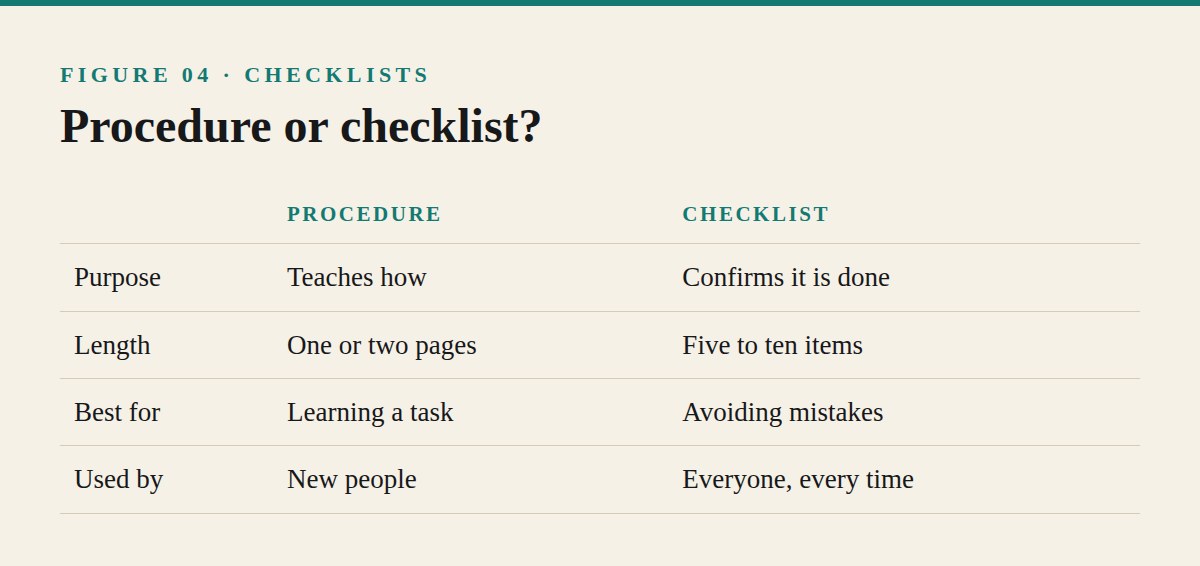
Professionals in many demanding fields use checklists, not because they lack skill, but because even skilled people forget steps when busy, tired or interrupted. In a small business, a forgotten step can mean a missed invoice, an incomplete delivery, a privacy mistake or an unhappy customer.
A checklist is the simplest system a business can create, and often the most effective.
Procedures and checklists are different
A procedure explains how to do a task. A checklist confirms that the critical steps have been done. Procedures help people learn; checklists help experienced people avoid mistakes. Most important processes benefit from both.
Focus on the critical steps
A checklist should not list every action. It should include the steps that are easy to forget and costly to miss. A good checklist is short, often five to ten items, so it can be used quickly every time.
Ask: which mistakes have happened before, and which steps would cause the most damage if skipped?
Write clear, checkable items
Each item should be specific and verifiable: "Delivery address confirmed with customer", "Invoice sent with order number", "Client files backed up". Avoid vague items such as "Check everything".
A person should be able to tick each item with confidence.
Use checklists at key moments
Checklists are especially useful at points where errors are likely: before sending a proposal, before shipping an order, before launching a website, at the start of a new client project and at the end of the month.
Make them easy to use
Keep checklists where the work happens: in a project management tool, a shared document, a printed sheet at a packing station or a template in your email system. If a checklist is difficult to reach, it will be skipped.
In teams, encourage everyone to use them, including the founder.
Build a habit
Checklists work only when used consistently. Make them part of the process: a task is not complete until the checklist is complete. In teams, encourage everyone to use them, including the founder.
Learn from mistakes
When something goes wrong, ask whether a checklist item could have prevented it. If so, add it. Over time, checklists become a record of lessons learned.
Remove items that no longer matter, so the list stays short and useful.
A practical tool: four starter checklists
Many small businesses benefit from four checklists first: a new customer checklist (onboarding steps), a delivery checklist (final quality checks), a month-end checklist (invoices, payments, bookkeeping, backups) and a launch checklist (for websites, products or campaigns). Start with the one connected to your most frequent mistakes.
Common mistakes
Checklists often fail because they are too long, too vague or kept somewhere inconvenient. Others are created once and never updated, or used only by new staff while experienced people skip them. Short, specific, accessible and consistently used checklists prevent the most mistakes.
An example in practice
A small web design studio occasionally launched sites with broken contact forms or missing privacy pages, which embarrassed the team and annoyed clients. It created a ten-item launch checklist covering forms, links, mobile display, privacy information, analytics, backups and client handover. Launch problems almost disappeared, and clients began commenting on how smoothly projects ended.
Checklists for the founder too
Founders often resist checklists, believing their experience makes them unnecessary. Yet founders are usually the busiest and most interrupted people in the business. Using checklists yourself also sets an example: when the founder treats the checklist as part of the work, everyone else does too.
Pause points
Some checklists work best at specific pause points rather than throughout a task: before starting work, before sending something to a customer and after completion. Short pauses at these moments, perhaps thirty seconds each, catch most mistakes without slowing the work. Deciding where the pause points are is often as important as writing the items.
Efficiency · 05 of 08
Templates and Reusable Assets
Every document you create more than once deserves a template. Small savings add up to whole days.
Small businesses create the same kinds of documents repeatedly: quotes, proposals, contracts, onboarding emails, project briefs, reports, invoices, meeting notes and social media posts. Creating each one from scratch wastes time and produces inconsistent quality. Templates turn repeated work into quick, reliable work.
A template is a pre-built starting point that captures the structure, wording and standards of a document you use often.
Find repeated documents
Review a typical month of work and list every document or message you created more than once. Common candidates include:
- Sales: quotes, proposals and follow-up emails.
- Delivery: project briefs, onboarding messages, reports and handover documents.
- Finance: invoices, payment reminders and expense records.
- Communication: frequently asked questions and standard replies.
- Marketing: content outlines, newsletter formats and social post structures.
Each repeated document is an opportunity to save time.
Capture your best version
Start each template from your best existing example: the proposal that won the most work, the onboarding email clients praised, the report clients found clearest. Templates should preserve what already works.
Separate fixed and variable parts
Mark clearly which parts of a template stay the same and which must be personalised: customer name, project details, prices and dates. Highlighting variable sections, perhaps with brackets or colour, reduces the risk of sending a document with someone else's details.
Keep personalisation in mind
Templates save time, but customers should never feel they received a generic copy. Leave space for a personalised sentence or two, especially in proposals and client emails. A template should handle the structure so you can focus on the personal parts.
Store all templates in a single shared location, organised by business area, with clear names and a short description of when to use each.
Organise templates in one place
Store all templates in a single shared location, organised by business area, with clear names and a short description of when to use each. Many tools, including email programs and document editors, support saved templates directly.
Build reusable assets too
Beyond documents, many assets can be reused: brand graphics, presentation slides, product photographs, case studies, standard contract clauses and answers to common objections. A library of approved assets speeds up work and keeps branding consistent.
Review templates regularly
As your offers, prices and processes change, templates must change too. Outdated templates can spread old prices or incorrect information quickly. Review templates at least twice a year and whenever something important changes.
A practical tool: a template library index
Create a one-page index listing every template, its purpose, its owner and the date it was last reviewed. Share the index with everyone who uses templates. When someone needs a document, the index tells them immediately whether a template exists and where to find it.
Questions to ask before creating a template
Ask three questions: Do we create this document at least monthly? Does inconsistency in this document cause problems? Would a new team member struggle to create it alone? If the answer to any question is yes, a template is likely worth the time it takes to build.
Common mistakes
Businesses often create templates from weak examples, forget to mark variable sections, send obviously generic messages or let templates become outdated. Others create templates nobody can find. Start from your best work, highlight what must change, store everything in one place and review regularly.
An example in practice
A consultant spent several hours preparing each proposal from scratch, reusing sections by searching old files. She built a proposal template from her three most successful proposals, with marked sections for client goals, recommendations and prices. Proposal preparation time fell from about four hours to one, and the quality became more consistent because every proposal followed the same proven structure.
Delegation · 06 of 08
Delegating Through Systems
Delegation fails when it depends on explanation. It succeeds when the system carries the knowledge.
Many founders try delegation once, find the results disappointing and conclude that it is easier to do everything themselves. Often, the problem is not the person who received the task but the way it was handed over: a quick verbal explanation, unclear standards and no reference to return to. Systems make delegation work because they carry the knowledge, not just the task.
Why delegation often fails
Delegation commonly fails for a few reasons: the task was not clearly defined, the expected standard was never explained, the person lacked the information or tools needed, or the founder took the task back at the first mistake. Each of these can be addressed with a good system.
Delegate outcomes, supported by process
Explain what result is needed, why it matters and how success will be judged. Then provide the procedure, checklist and templates that support the work. Outcomes give people purpose; systems give them a reliable path.
Start with well-documented tasks
Begin by delegating tasks that already have clear procedures and checklists. Documented tasks are easier to hand over and easier to review. As confidence grows, delegate more complex or judgement-based work.
Train using the system
When training someone, walk through the written procedure together rather than explaining from memory. Ask them to perform the task while you observe, then let them do it independently with the documentation. This approach also tests whether the procedure is clear.
Agree check-ins and decision rights
Decide how often you will review the work at first and which decisions the person can make alone. For example, a team member might resolve customer issues up to a certain value without approval. Clear decision rights reduce constant questions and build confidence.
This approach also tests whether the procedure is clear.
Expect a learning period
New people make mistakes while learning. Treat early errors as information: was a step unclear, a standard missing or a tool inadequate? Improve the system rather than taking the task back.
Gradually reduce oversight
As the person becomes reliable, reduce the frequency of checks. Move from reviewing every piece of work to reviewing samples, and eventually to reviewing results only.
A practical tool: the delegation brief
For each delegated task, write a short brief: the outcome required, why it matters, the procedure and templates to use, the standard expected, decisions they can make alone, when to ask for help and how often you will review the work. A one-page brief prevents most delegation misunderstandings.
What not to delegate yet
Some tasks are best kept until systems mature: work that depends on unwritten judgement, sensitive client relationships during difficult periods and decisions with large financial consequences. Document the thinking behind these tasks gradually, so they can be delegated later.
Common mistakes
Founders often delegate tasks without documentation, give vague instructions, hover over every step or take tasks back after the first mistake. Others delegate only tasks they dislike, without considering whether the person has the skills or information to succeed. Systems, clear briefs and patience make delegation reliable.
An example in practice
An accountant wanted to delegate monthly bookkeeping for small clients but had tried twice without success. This time, she documented the full procedure, created a checklist and a delegation brief, trained a junior colleague using the documents and reviewed every file for the first two months. By the third month, she reviewed only samples. The colleague became fully independent, and the accountant gained a day each week for advisory work.
Delegation and the founder's role
Every task delegated successfully changes what the founder can do. Track the hours freed each month and decide in advance how to use them: winning better clients, improving the offer, developing people or simply working fewer evenings. Without a plan, freed time is often absorbed by new small tasks.
Quality · 07 of 08
Building Quality Into the System
Quality should not depend on one careful person. Design it into how the work is done.
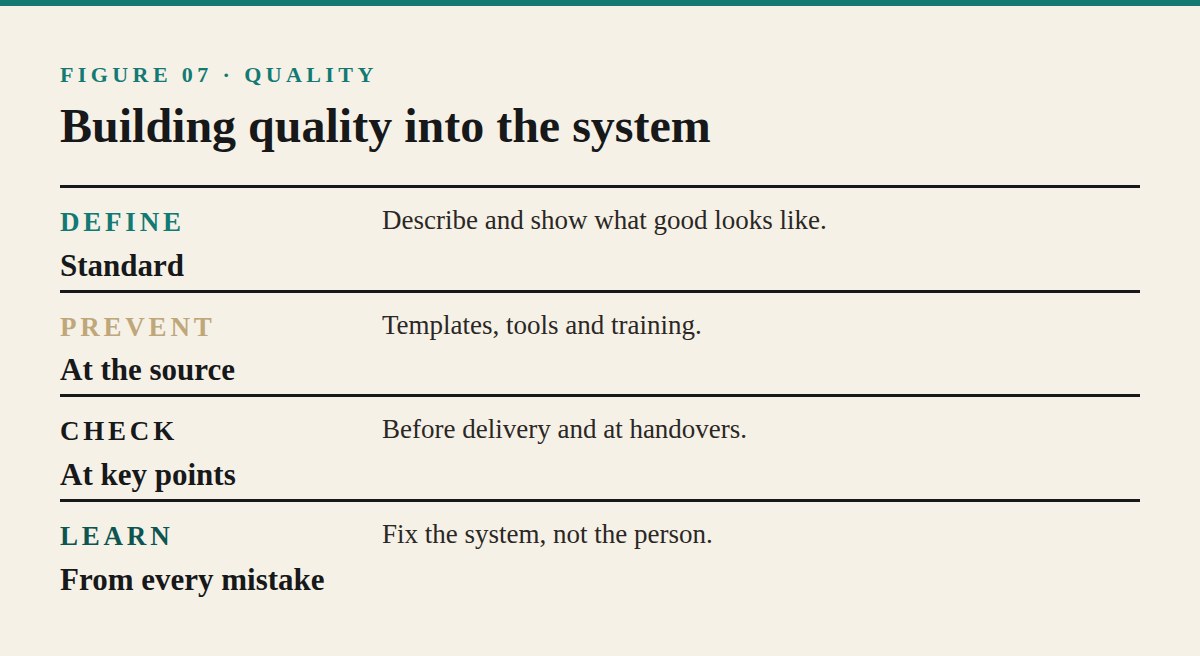
In many small businesses, quality depends on the founder checking everything personally. When the founder is busy or away, quality slips. As the business grows, this approach becomes impossible. Lasting quality comes from building standards and checks into the system itself, so good work is the normal outcome rather than the result of heroic effort.
Define what good looks like
Quality begins with a clear standard. For each core process, describe what a good result looks like: accuracy, completeness, presentation, timing and customer experience. Use examples where possible, such as a model report, a correctly packed order or a well-written client email.
People cannot meet a standard they have never seen.
Prevent errors at the source
The most effective quality systems prevent mistakes rather than catching them later. Clear procedures, templates, checklists, good tools and adequate training all reduce errors at the source. Ask where mistakes usually begin and redesign that step.
Build checks at the right points
Some checks are still necessary. Place them where errors are most costly or most likely: before delivery to a customer, before money is sent or received and at handovers between people. A short check at the right moment prevents much larger problems.
Use peer review
For important work, a second person can review before delivery. Peer review catches errors the original author misses and spreads knowledge across the team. Even a brief review against a checklist is valuable.
Measure quality
Track a few simple indicators: error rates, rework, customer complaints, refunds, returns and on-time delivery. These numbers show whether quality is improving or slipping, and help you see the effect of system changes.
These numbers show whether quality is improving or slipping, and help you see the effect of system changes.
Learn from every problem
When something goes wrong, look for the cause in the system rather than blaming the person. Was a step missing? Was the standard unclear? Was the tool unreliable? Fix the system so the same mistake is less likely to happen again.
Make quality everyone's responsibility
Encourage everyone involved to raise concerns, suggest improvements and stop work when something seems wrong. People closest to the work often notice problems first. A culture that welcomes these observations protects quality far better than inspection alone.
A practical tool: the quality standard sheet
For each core process, create a one-page sheet showing the standard: a description of a good result, an example, the three most common mistakes and how to avoid them, and the final check before delivery. Display or link these sheets wherever the work is done.
Questions after a mistake
After any significant mistake, ask four questions without blame: What happened? Why did the system allow it? What change would prevent it? How will we know the change worked? Recording the answers in a simple log turns mistakes into permanent improvements.
Common mistakes
Businesses often rely on the founder's final check, define standards vaguely, inspect too late or blame individuals instead of fixing systems. Others measure nothing, so quality changes go unnoticed. Clear standards, error prevention, well-placed checks and blame-free learning create reliable quality.
An example in practice
A small printing business received occasional complaints about colour mismatches and incorrect quantities. Instead of checking every job personally, the owner created a quality standard sheet for each product, introduced a pre-print checklist confirming file, colour profile and quantity, and added a quick peer check before dispatch. Complaints fell significantly, and the owner no longer needed to inspect every order.
Quality and speed
Many founders fear that quality systems will slow work down. In practice, well-designed systems usually speed it up, because less time is spent on rework, corrections and customer complaints. The few minutes spent on a checklist are almost always cheaper than fixing a mistake after it reaches the customer.
Improvement · 08 of 08
Improving Systems Over Time
The first version of a system is rarely the best. Small, regular improvements make it excellent.
Creating a system is only the beginning. Processes change as the business grows, customers' needs evolve, new tools appear and people discover better ways of working. A system that is never reviewed gradually becomes outdated, ignored or even harmful. Continuous improvement keeps systems useful and trusted.
Treat systems as living documents
Make it clear that systems are expected to change. Encourage everyone who uses a procedure to suggest improvements. A document with a recent review date and visible updates signals that the system is current and worth following.
Collect improvement ideas
Create a simple way to capture suggestions: a shared document, a channel in your team chat or a recurring agenda item in meetings. Ideas often come from the people doing the work every day, who notice unnecessary steps or recurring problems.
Review systems regularly
Schedule reviews for important systems, perhaps quarterly for core processes and annually for others. During each review, ask: Is the process still accurate? Are steps unnecessary or missing? Are mistakes still occurring? Could a template, checklist or tool help?
Make small changes
Improvements do not need to be dramatic. Remove one unnecessary step, clarify one confusing instruction or add one missing check. Small, frequent improvements are easier to adopt and less disruptive than large redesigns.
Test changes before adopting them
When considering a significant change, test it with a small number of jobs or customers first. Measure the effect on time, quality and customer experience. Adopt the change only if it improves results.
When considering a significant change, test it with a small number of jobs or customers first.
Update documentation immediately
When a process changes, update the procedure, checklist and templates at the same time. Outdated documentation causes confusion and teaches people to ignore systems altogether.
Communicate changes
Tell everyone affected what has changed and why. A short message explaining the reason for an update helps people adopt the new process and trust that changes are made thoughtfully.
Retire systems that no longer help
Some systems outlive their usefulness. If a process is no longer needed, archive its documentation clearly so it does not cause confusion.
A practical tool: the system review calendar
List each documented system with its owner and a scheduled review date. Add the dates to the owners' calendars. During each review, record what was changed and why. Over time, this calendar keeps every system current without relying on memory.
Questions for a system review
A short set of questions makes reviews efficient: Did anyone struggle with this process recently? Did any mistakes occur? Has anything changed in our tools, offers or customers? Is any step no longer needed? What one change would make this process easier or more reliable? Thirty minutes with these questions is usually enough.
Common mistakes
Businesses often create systems and never revisit them, make large changes without testing, update the process but not the documentation or fail to explain changes to the people affected. Others hold on to systems that no longer serve a purpose. Regular reviews, small tested changes and clear communication keep systems effective.
An example in practice
A small software support team wrote procedures for handling customer requests but rarely updated them. Over a year, tools changed and staff began working around the outdated documents. The team introduced quarterly reviews, a shared suggestions document and a rule that any process change required an immediate documentation update. Within months, staff began using the procedures again, and response times improved.
Building an improvement habit
The best businesses treat improvement as part of normal work rather than an occasional project. A few minutes at the end of each week asking "What slowed us down, and how could we prevent it?" gradually produces a business that runs more smoothly every month.
Before you close this edition
Your Action Plan
Your next 30 days
Week 1: List your core processes. Write down the ten tasks your business repeats most often and mark the three that cause the most problems.
Week 2: Document one. Record yourself doing the most important process and turn it into a short written procedure.
Week 3: Add checklists and templates. Create a checklist for that process and templates for the documents it uses.
Week 4: Test and improve. Ask someone else to follow the process, note where they hesitate and improve the document.
Keep learning
Hustle Influence offers practical online courses and AI tools that help you turn ideas into action.
hustleinfluence.com
HUSTLE MAGHustle in Silence.